Audio Lab
Find out what's actually wrong with your audio.
Audio Lab turns your own computer into an audio checking station that measures every file you give it and tells you, in plain language, which ones are fine and which ones need your attention.
$29when it goes on sale
Not on sale yet. The kit is built and checked by machine. Before it goes on sale, someone who has never seen it has to use it, and we have to buy it from ourselves through the real checkout.
Tell me when it's ready
The problem
You have audio files. You want to know which ones have a real problem and which ones are fine. Right now that means opening them one at a time in an editor, squinting at a meter, and knowing what the meter means.
What it does
Audio Lab is a complete kit: it checks your computer, sets up a workspace, measures your audio against professional targets, and hands you a report you can actually read. Where a machine can measure something — loudness, clipping, phase, loop joins, silence — it measures it. Where only ears can decide, it builds you a blind listening test instead of pretending to know.
- Know which files are actually broken, and which ones just sound different
- Check a hundred files in the time it takes to open one in an editor
- Get the same answer every time, so you can prove a fix worked
How it works
7 steps, in order
-
Check your computer
One double-click. Audio Lab reports what it found and what is missing. It installs nothing at this stage.
-
Set up the lab
It creates its workspace and fetches the one tool it needs, into its own folder. Nothing else on your computer changes.
-
Add your audio
Drop files into MY-AUDIO. Your originals are opened read-only and never modified.
-
Analyze
It asks one question - what kind of audio is this? - then runs fifteen measurements on every file against the right targets. It remembers your answer, so it only asks once.
-
Review
A report opens in your browser. Good, Review, Needs attention - each one with the reason and what to do.
-
Listen
For anything a machine cannot decide, Audio Lab builds a blind A/B test. You decide with your ears; it records your answer.
-
Finish
One dated folder with the report, the measurements, your listening notes and a checksum for every file. Keep it, or send it with the work.
What you get
- START HERE - a guided walkthrough that opens in your browser, no installation
- A seven-step illustrated guide: Check, Set Up, Add Audio, Analyze, Review, Listen, Finish
- The Audio Lab engine - fifteen measurements per file, run on everything at once
- A readable report: every file marked Good, Review, or Needs attention, with the reason in plain English
- Blind listening packs for the calls a machine is not allowed to make
- Repair candidates written to a separate folder, with a record of exactly what was done
- Agent instructions for Claude, ChatGPT, Codex and generic agents
- Example audio and an example finished report, so you can see it work before using your own files
- Troubleshooting, FAQ, and a stated privacy and security model
What it does not do
Published here, before the price, on purpose. A kit that surprises you after checkout is a kit that gets refunded.
- This is not a repair service and it is not mastering. It measures, it flags, and it offers bounded candidates - it does not make your mix good.
- No Mac or Linux version in v1.0. The measurements are cross-platform; the one-click launchers are Windows-only.
- It does not judge whether your music sounds good. Nothing here has taste.
- It is not a DAW, a plugin, or a VST. It does not go inside your recording software.
- No AI subscription is included. The kit works without an agent; the agent just does the setup for you.
Who it's for
- Musicians and producers who want to know if a mix is technically clean before it goes out
- Podcasters who keep getting told their episode is too quiet or too loud
- Game and app developers checking that loops join without a click
- Sample and loop sellers doing QA on a pack before it ships
- Anyone who has been handed a folder of audio files and asked whether they are any good
What you need
- A Windows 10 or 11 computer
- Python 3.10 or newer - free, and the kit tells you exactly how to install it if you don't have it
- FFmpeg - free, and the kit installs it into its own folder for you
- About 500 MB of free disk space
- Internet access the first time, to download those two free tools
- Optional: an AI agent (Claude, ChatGPT, Codex) if you would rather have it do the setup for you
What comes out
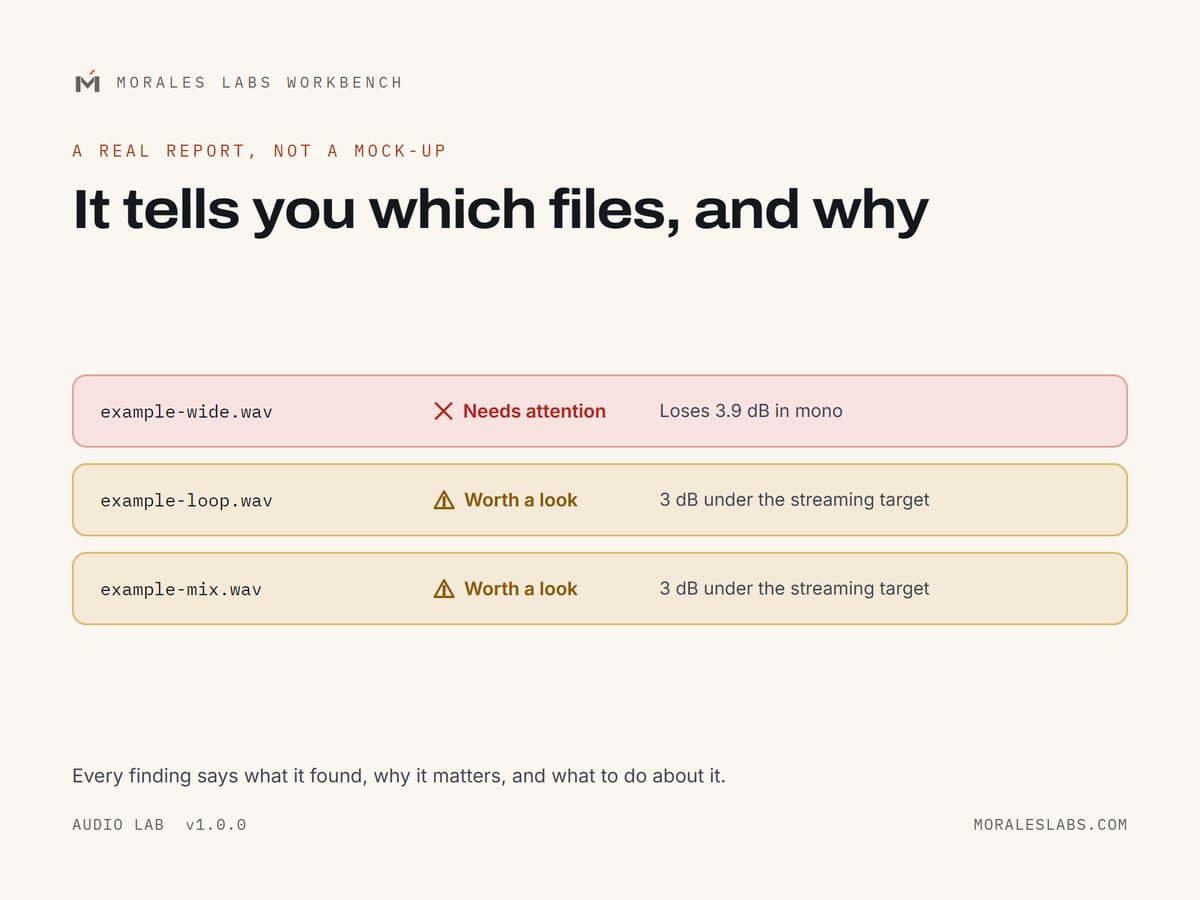
A real report, not a mock-up
This is the report the engine produced from the example files that ship inside the kit. Same numbers, same wording, same verdicts.
Questions
Do I need to know what LUFS means?
No. The report says 'quieter than streaming platforms expect' and tells you what to do. The number is there if you want it.
Will it change my files?
No. Your files are opened read-only. Anything Audio Lab renders goes into a separate OUTPUT folder with a record of what was done.
Does my audio get uploaded anywhere?
No. Every measurement runs on your computer. Audio Lab makes no network calls at all after the one-time tool download in step 2.
Do I need an AI subscription?
No. The kit runs on its own. If you do have Claude, ChatGPT or Codex, there are instructions that let it do the setup for you.
Is there anything to configure?
One question, asked once: what kind of audio are you checking? Press a number or press Enter for Music. Audio Lab remembers it. There are no settings files to edit and nothing to install beyond what step 2 does for you.
I'm not technical. Is this for me?
The normal path is double-clicking numbered files in order. There is no command line and nothing to configure. If step 1 finds something missing, it tells you exactly what to click.
Does it work on a Mac?
Not in version 1.0. The one-click launchers are Windows-only. A Mac version is a real possibility if there's demand - it is not promised.
What if it doesn't work on my computer?
Run step 1 first - it is free to run, changes nothing, and tells you before you have spent any time. HELP/TROUBLESHOOTING.md covers every failure the kit knows how to produce.
Audio Lab is nearly here
$29when it goes on sale
Not on sale yet. The kit is built and checked by machine. Before it goes on sale, someone who has never seen it has to use it, and we have to buy it from ourselves through the real checkout.
Tell me when it's ready